The net worth tracker that never asks who you are
Property, stocks, gold, cash, crypto and anything else you value, in one figure, on every screen you use. Your holdings are written to your own device, and nothing is uploaded unless you switch on a feature that needs it. Free, no paid tier, no account, works offline.
The app itself
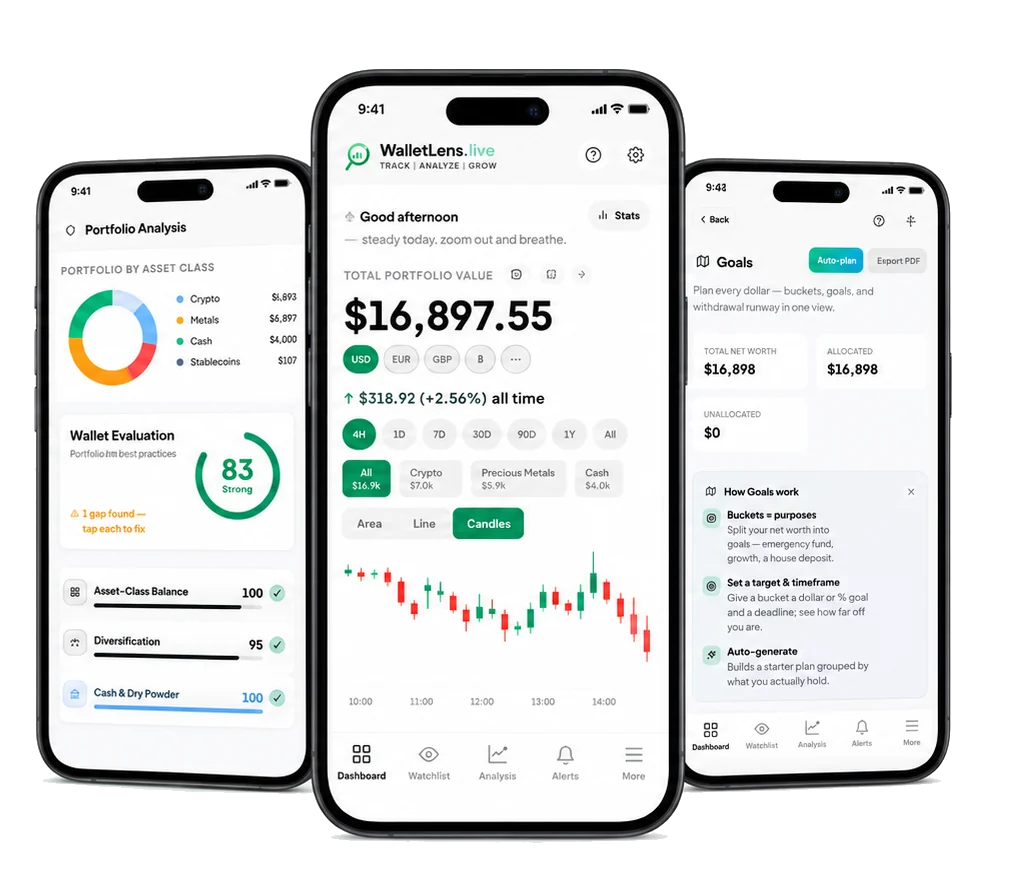
Analysis — allocation by asset class, and a wallet evaluation that names the gaps rather than scoring you and leaving it there. Dashboard — net worth in any currency, over any window, with the asset classes broken out beneath it. Goals — every dollar assigned to a purpose, with a target, a deadline and the runway left on each. Real screens, example portfolio.
One store, three ways in
Your holdings are written once, to your own device. The web app is where you build the portfolio. The Android app watches while you are not looking and sends alerts with the app closed. The Chrome extension keeps a mirrored copy so it can show your net worth from any tab without loading a page. Nothing is reconciled through an account and nothing sits in the middle.
Exactly what leaves your device
Sent by default: a ticker symbol, so a public price feed can quote it. BTC, ETH, AAPL, XAU, and nothing beside it.
Sent only if you switch it on: price alerts send the tickers you hold so they can be watched for you; screenshot import sends the picture you chose; Portfolio Guardian sends your heirs’ email addresses and a snapshot for them; the weekly email sends your address and your total. Each is off until you turn it on, each can be turned back off, and none is needed to use WalletLens as a tracker.
Never sent, whatever you switch on: your transaction history, your notes, a password, a bank or brokerage connection, or an account, because there isn’t one. A backup goes to your own Google Drive, encrypted on the device before it leaves, and you hold the passphrase. Every feature above that sends anything is named, and each one can be turned back off.
What most trackers leave out
Your net worth is a house, a pension, some shares, a little gold and whatever crypto you hold, and it only means anything once it sits in one figure. Trackers like Kubera and Empower charge a subscription for that all-asset view; CoinStats and Delta cover crypto and stop there.
- Every asset in one number. Property and land, any US stock or ETF, gold and silver by the gram, cash in any currency, bonds, crypto, and anything you value yourself: art, watches, a car, a stake in a business. Most trackers make you pick a category. This one is the whole balance sheet.
- Portfolio Guardian. Name the people who should reach your portfolio if something happens to you. Opening the app resets the countdown, and WalletLens warns you by email for two weeks before it ever contacts anyone, so it only fires when you have genuinely stopped. What they receive is a snapshot of what you hold, never access to an account and never anything that can move funds. It is a rare thing in a portfolio tracker, and it works here because there is no account for anyone to inherit.
- Photograph your holdings in. Point your camera at any broker, exchange or wallet screen, or even a handwritten list, and WalletLens reads the rows off the picture. It works with institutions that have no API at all, and it never needs a login of yours.
- Or just say it out loud. “I bought half a Bitcoin at 65K and twenty Apple shares.” One sentence, several trades, parsed in English or Arabic. Typing rows on a phone is where most portfolios go stale.
- Paste a wallet address. An ETH, BTC or Solana address is enough. Balances arrive on their own, with no API key to generate, no exchange login and no read-only permission to hand over.
- One signal per holding. The Magic Indicator weighs eight pillars for a coin and seven for a share into one reading, from strong buy through to distribute: technical and momentum always, then whale flow, on-chain activity, sentiment and cycle for crypto, or earnings, sector, dividend and market for equities. Comparable signals usually sit behind a paid tier.
- Alerts that name what you hold. Price moves, round-number levels, your own targets, seven-day trend switches on your crypto, news that names something you own, a daily digest and a reminder when zakat falls due. Each one opens straight to the holding it is about.
- Zakat, calculated on the real thing. Your live net worth against a nisab priced from current gold and silver. Gold or silver standard, lunar or solar year, long-term shares handled properly. It tracks the hawl and reminds you before it completes.
- Tax-ready without the upgrade. A full transaction CSV your accountant can work from, or that you map into Koinly, CoinTracker or TurboTax in a couple of clicks, plus an Excel export of your holdings whenever you want your own numbers out. Tax export is a paid feature in most trackers.
- A Drive backup that keeps itself current. Connect Google Drive once and WalletLens backs itself up from then on: shortly after you add a trade, on a slow sweep for edits nothing announced, and again when you open the app after a while away. It uploads only when something actually changed, it renews its own access quietly so it never stops working or asks you to sign in again, and every backup is encrypted on your device before it leaves. Open WalletLens on a new phone and the portfolio restores itself.
- Free with nothing held back. No paid tier, no holding limit, no paywalled chart, no trial that ends. The parts that usually cost money are the parts that need a server holding your portfolio, and there is not one.
- Reads fine on a plane. Net worth, allocation, profit and loss and history all render from data already on the device. Only fresh prices need a network connection.
WalletLens reports what you hold and what public markets say it is worth. Nothing here is financial advice.
Frequently asked questions
Is WalletLens really free?
Yes. No paid tier, no subscription, no holding limit and no feature behind a paywall. The expensive part of a tracker is the server that stores your portfolio, and WalletLens does not have one.
Is this only for crypto?
No. WalletLens is a net worth tracker and crypto is one line in it. Property, any US stock or ETF, gold, silver and platinum by weight, cash in any currency, bonds, and anything you value yourself all sit in the same figure.
Does WalletLens connect to my bank or brokerage?
No. There is no Plaid-style connection, no credentials are asked for and nothing is linked. You enter holdings yourself, or photograph a screen, or speak them, or paste a public wallet address.
Can I track things with no market price, like a house?
Yes. Enter your own valuation for property, a car, a business stake, art or watches, and update it whenever you like. It counts towards your net worth and towards zakat alongside everything priced live.
Do I have to create an account?
No. There is nothing to sign up for and no password to lose. Open it and start entering holdings, which are written to your own device.
Where is my portfolio actually stored?
In your browser or phone storage. No server holds a copy by default, which is why there is nothing to breach, nothing to sell and nothing to hand over. Features you switch on yourself can send specific data, and each one is named on this page.
What happens to my portfolio if I die?
Portfolio Guardian is a dead man’s switch. You nominate the people who should reach your holdings, and every time you open WalletLens the countdown resets. If it ever runs out, you are warned by email for two weeks first, and only then are they sent a snapshot of what you hold. They receive a picture of the portfolio, never a login and never anything that can move funds.
How do I leave my crypto and investments to my family?
Without handing anyone a seed phrase or an exchange password. Portfolio Guardian sends your nominated people a readable snapshot of everything you hold across every asset class, so they know what exists and where to look. Custody stays exactly where it already is.
Does WalletLens calculate zakat?
Yes, on your live portfolio, against a nisab priced from current gold and silver. Gold or silver standard, lunar or solar year, long-term shares counted at the usual portion, and property and cash included. It tracks the hawl and reminds you before it completes.
How does screenshot import work?
It reads the holdings off a picture of any broker, exchange or wallet screen. Because it reads a picture rather than connecting to an API, it works with institutions that have no integration at all, and it never needs a login of yours. The image you choose is sent for reading and is not kept.
Do the three apps share one portfolio?
The web app and the Android app read the same store on the device. The Chrome extension keeps a mirrored copy so it can show your total without loading a page, refreshed whenever you open walletlens.live. Moving between devices goes through the encrypted Google Drive backup, which WalletLens keeps current for you.
Do I have to remember to back up?
No. Connect Google Drive once and WalletLens keeps the backup current by itself, shortly after you make a change and again when you open the app after time away. It skips the upload when nothing has changed, and it renews its own access in the background so it never quietly stops. The file is encrypted on your device before it is uploaded, into a folder you own, and you hold the passphrase.
Will it tell me when something moves?
The Android app sends price moves, round-number levels, your own targets, seven-day trend switches on your crypto, news naming what you hold, a daily digest and zakat reminders. Notifications arrive with the app closed, and each opens straight to that asset.
Is there an iPhone app?
Not in the App Store yet. Open walletlens.live in Safari and add it to your home screen: it installs and runs like an app, offline included, and it is the same portfolio the other surfaces read.
Does it work offline?
Net worth, allocation, profit and loss and history all render from data already on the device. Only fresh prices need a network connection.
Open the free net worth tracker → · Zakat calculator · Rebalancing calculator · Privacy
WalletLens: the complete management tool for crypto and digital assets
WalletLens is a complete management tool for crypto and digital assets, covering crypto, US stocks, gold, silver, bonds, cash and FX in one dashboard. Add holdings by voice or straight from a screenshot, track and manage everything in one place, and get AI analysis, risk scanning and price alerts on top. Free, with no account and no subscription. A free alternative to Kubera, CoinStats, and Personal Capital.
Why WalletLens is the best management tool for crypto and digital assets
- No account required — open the app and start tracking instantly. No sign-up, no email, no password.
- Track crypto and stocks together — Bitcoin, Ethereum, and 10,000+ coins alongside Apple, Tesla, Nvidia, ETFs, gold, silver, and cash in one net-worth total.
- 100% free — no paid tier, no premium paywall, no subscription. Every feature is free forever.
- Smart money flow — see which tokens large wallets are moving in and out of, live in the header.
- AI portfolio analysis — portfolio health score A–F, diversification grade, risk scanner, stress test, and rebalance planner — all on your device.
- Import from screenshot — photograph any exchange, broker or wallet screen; AI reads it into your portfolio.
- Voice import (English & Arabic) — speak your trades hands-free, AI logs them instantly.
- Excel / CSV import & export — download your portfolio as a CSV for Excel, Google Sheets, or your accountant; import a spreadsheet to bulk-add holdings.
- Crypto tax report export — export your full transaction history as a CSV for Koinly, CoinTracker, TurboTax, or your tax professional.
What you can do with WalletLens
- Track your whole net worth across every asset class in a single dashboard with live prices.
- Investment performance tracker — see your P&L, ROI, and cost basis in dollars and percentage, broken down by asset and category.
- AI portfolio analysis — health score, personalised Fear & Greed gauge, stress tests, entry quality, and a rebalance planner, all computed on your device.
- Multi-target sell plans — set crypto price targets and the percentage of each holding to sell, with live progress bars.
- Whale tracker — real-time large Bitcoin transactions and volume anomalies.
- Private by design — portfolio tracker with no bank account link required; no exchange API keys needed.
Free portfolio tracker vs paid alternatives
WalletLens is a free alternative to every paid portfolio tracker:
- Free alternative to Kubera — Kubera costs $199–$249/yr. WalletLens is free forever, covers the same asset classes, and keeps data on your device.
- Free alternative to CoinStats — WalletLens is free with no account; CoinStats requires sign-up and a paid plan for full features.
- Free alternative to Personal Capital / Empower — WalletLens requires no bank login and no account; Empower upsells wealth-management services.
- Free alternative to CoinTracker / Delta — WalletLens tracks stocks, gold and FX too, not just crypto, and stores everything locally.
Track popular cryptocurrencies free
- Track Bitcoin (BTC)
- Track Ethereum (ETH)
- Track Solana (SOL)
- Track XRP (XRP)
- Track Cardano (ADA)
- Track Dogecoin (DOGE)
- Track BNB (BNB)
- Track Polkadot (DOT)
- Track Chainlink (LINK)
- Track Litecoin (LTC)
- Track Avalanche (AVAX)
- Track Polygon (POL)
- Track TRON (TRX)
- Track Shiba Inu (SHIB)
- Track Uniswap (UNI)
- Track Cosmos (ATOM)
- Track Stellar (XLM)
- Track Monero (XMR)
- Track Bitcoin Cash (BCH)
- Track Aave (AAVE)
- Track Algorand (ALGO)
- Track NEAR Protocol (NEAR)
- Track Tezos (XTZ)
- Track Ethereum Classic (ETC)
Track US stocks & ETFs free
- Track Apple (AAPL)
- Track Microsoft (MSFT)
- Track NVIDIA (NVDA)
- Track Tesla (TSLA)
- Track Amazon (AMZN)
- Track Alphabet (Google) (GOOGL)
- Track Meta Platforms (META)
- Track S&P 500 ETF (SPY) (SPY)
- Track Nasdaq-100 ETF (QQQ) (QQQ)
- Track Vanguard S&P 500 ETF (VOO) (VOO)
Track precious metals free
Free profit & ROI calculators
- Bitcoin profit calculator
- Ethereum profit calculator
- Solana profit calculator
- XRP profit calculator
- Dogecoin profit calculator
- BNB profit calculator
- Avalanche profit calculator
- Cardano profit calculator
- Apple Stock stock profit calculator
- NVIDIA Stock stock profit calculator
- Tesla Stock stock profit calculator
- Gold profit calculator
- Silver profit calculator
- Crypto profit calculator (any coin)
- Investment profit calculator (any asset)
- Portfolio rebalancing calculator
Live prices
- Bitcoin price today (BTC)
- Ethereum price today (ETH)
- Solana price today (SOL)
- XRP price today (XRP)
- Cardano price today (ADA)
- Dogecoin price today (DOGE)
- BNB price today (BNB)
- Avalanche price today (AVAX)
- Polkadot price today (DOT)
- Chainlink price today (LINK)
- Litecoin price today (LTC)
- Polygon price today (POL)
- Shiba Inu price today (SHIB)
- TRON price today (TRX)
- Uniswap price today (UNI)
- Gold price today (XAU)
- Silver price today (XAG)
- Platinum price today (XPT)
- Apple price today (AAPL)
- NVIDIA price today (NVDA)
- Tesla price today (TSLA)
- Microsoft price today (MSFT)
- Amazon price today (AMZN)
Compare WalletLens
- WalletLens vs Kubera
- WalletLens vs CoinStats
- WalletLens vs Empower (Personal Capital)
- WalletLens vs Delta
- WalletLens vs CoinMarketCap Portfolio
- WalletLens vs Blockfolio / FTX App
- WalletLens vs a Spreadsheet
- WalletLens vs Personal Capital
Investing & crypto glossary
- What is Cost Basis?
- What is ROI (Return on Investment)?
- What is P&L (Profit and Loss)?
- What is Break-Even Price?
- What is Market Capitalization?
- What is Fully Diluted Valuation (FDV)?
- What is Dollar-Cost Averaging (DCA)?
- What is RSI (Relative Strength Index)?
- What is MACD?
- What is Moving Average?
- What is Fear and Greed Index?
- What is Stablecoin?
- What is Market Order?
- What is Limit Order?
- What is Bull Market?
- What is Bear Market?
- What is Volatility?
- What is Liquidity?
- What is Portfolio Rebalancing?
- What is Asset Allocation?
- What is Diversification?
- What is Net Worth?
- What is Unrealized Gain?
- What is Realized Gain?
- What is Capital Gains Tax?
- What is HODL?
- What is Fiat Currency?
- What is DeFi (Decentralized Finance)?
- What is Staking?
- What is Yield?
- What is Blockchain?
- What is Crypto Wallet?
- What is Private Key?
- What is Gas Fee?
- What is ETF (Exchange-Traded Fund)?
- What is Index Fund?
- What is Dividend?
- What is Compound Interest?
- What is Inflation Hedge?
- What is Risk Tolerance?
Guides & articles
- How to Track Sell Targets and Plan Your Exit Strategy — Learn how to set smart crypto and stock sell targets, track progress toward them, and build an exit strategy before emotions take over.
- How to Track Investments When You're Just Starting Out — New to investing? Learn exactly how to track your first portfolio across crypto, stocks, and cash — without spreadsheets or expensive tools.
- How to Track Investments When You Hold Cash and Crypto — Learn how to track cash savings alongside crypto and stocks in one net-worth view — without spreadsheets, accounts, or privacy risks.
- How to Track Dividend Income Alongside Capital Gains — Learn how to track dividend income and capital gains together in one portfolio view — so you always know your true total return.
- How to Track Your Portfolio Health Score (And What It Means) — Learn what a portfolio health score measures, why it matters for investors in 2026, and how to use it to make smarter decisions about risk and allocation.
- How to Track Crypto Portfolio Performance Over Time — Learn how to measure, record, and improve your crypto portfolio performance over time — without spreadsheets or giving up your privacy.
- How to Track a Portfolio When You Have Multiple Brokers — Juggling investments across several brokers and exchanges? Learn how to unify everything into one clear net-worth view without spreadsheet chaos.
- How to Track Average Cost Basis Across Multiple Buys — Learn how average cost basis works when you buy an asset multiple times, why it matters for P&L, and how to track it automatically for free.
- How to Track Real Estate Alongside Crypto and Stocks — Learn how to include property in your net-worth picture and track real estate alongside crypto and stocks in one unified portfolio view.
- How to Stress-Test Your Investment Portfolio Before a Crash — Learn how to stress-test your portfolio against market crashes before they happen, so you can protect gains and sleep at night.
- How to Import Your Crypto Portfolio by Voice — No Typing Required — WalletLens lets you log trades just by speaking. This guide shows you how voice import works, what phrases it understands, and why it is the fastest way to keep a portfolio up to date.
- How to Import a Portfolio From a Screenshot in Seconds — WalletLens can read a screenshot of any exchange, broker or wallet app and turn it into a tracked portfolio automatically. This guide explains how it works and which apps are supported.
- How to Export Your Crypto Portfolio to Excel (Free, No Account) — WalletLens lets you download your full portfolio — holdings, cost basis, P&L, allocation — as a CSV file compatible with Excel and Google Sheets. Free, instant, no sign-up.
- How to Generate a Crypto Tax Report for Free (No Account Needed) — You need accurate transaction records to file a crypto tax return. WalletLens exports a complete transaction history CSV — free, no account — that you can hand to your accountant or import into Koinly or CoinTracker.
- How to Track Your Crypto Portfolio for Free in 2026 — A complete guide to tracking Bitcoin, Ethereum, and altcoin holdings without paying for a subscription or giving up your private keys.
- What Is a Bitcoin Whale Transaction? (And Why It Matters) — Large Bitcoin transactions — often called "whale moves" — can signal shifts in market sentiment. Here's how to spot them and what they might mean for price.
- The Fear & Greed Index for Crypto: What It Is and How to Use It — The Fear & Greed Index is one of the most watched sentiment indicators in crypto. Learn what drives it, how to read it, and how WalletLens calculates a personalised version for your own portfolio.
- How to Diversify Your Portfolio Across Crypto, Stocks, and Gold — Diversification across asset classes reduces risk without necessarily reducing returns. Here's a practical framework for balancing crypto, equities, and hard assets.
- How to Set Crypto Profit Targets (And Actually Stick to Them) — Most crypto investors buy well but sell poorly — either too early or, more often, too late. A systematic profit-taking plan removes emotion from the decision.
- Dollar-Cost Averaging in Crypto: A Complete Beginner’s Guide — Dollar-cost averaging removes the impossible task of timing the market by spreading your buys over time. Here is how DCA works, when it beats lump-sum investing, and how to track it accurately.
- How to Calculate Your Crypto Cost Basis and Profit/Loss — Your cost basis determines your real profit, your break-even price, and your tax bill. Here is how average cost works, how it differs from FIFO, and how to track it without a spreadsheet.
- Stablecoins Explained: USDT, USDC, and Why They Are Dry Powder — Stablecoins are the backbone of crypto trading, but they behave nothing like Bitcoin. Here is what backs them, the risks to watch, and why your tracker should treat them as cash rather than profit.
- Gold vs Bitcoin: Comparing Two Stores of Value — Bitcoin is often called "digital gold," but the two assets differ in supply, volatility, and history. Here is an even-handed comparison to help you decide how each fits a diversified portfolio.
- Understanding Crypto Market Cycles and the Bitcoin Halving — Crypto moves in dramatic boom-and-bust cycles that rhyme with the Bitcoin halving. Knowing the four phases of a cycle can keep you from buying euphoria and selling despair.
- Position Sizing and Risk Management for Volatile Assets — Survival is the prerequisite for returns. Learn how position sizing, concentration limits, and a simple risk framework keep a single bad bet from wiping out your portfolio.
- What Is Net Worth and How to Calculate Yours — Net worth is the single most important number in your financial life. Here is what it means, how to calculate it accurately, and why most people get it wrong.
- How to Grow Your Net Worth: A Practical Framework — Growing net worth is not about earning more — it is about the gap between what you build and what you owe. Here is a practical framework that works across income levels.
- How to Track Your Net Worth Across Crypto, Stocks, Gold, and Cash — Your financial picture is scattered across wallets, brokerages, bank accounts, and metal holdings. Here is how to bring it all into one live net worth view without spreadsheets or subscriptions.
- Is It Safe to Connect Your Exchange API to a Portfolio Tracker? — Thinking about linking your exchange API to a portfolio tracker? Learn the real risks, what to check, and safer alternatives before you connect.
- How to Rebalance a Crypto and Stock Portfolio (Step by Step) — Learn what portfolio rebalancing means, when to do it, and a practical step-by-step method for crypto, stocks, and other assets in 2026.
- Best Free Crypto Portfolio Trackers With No Account (2026) — A practical comparison of free crypto portfolio trackers you can use without creating an account — the privacy trade-offs, what to look for, and how the no-signup options actually differ.
- How to Track Crypto and Stocks Together in One Portfolio — Most people hold crypto, stocks, and some cash or gold — but track each in a separate app and never see the whole picture. Here is how to view your true net worth across every asset class in one place.
- Crypto Tax Basics: What Beginners Need to Know — A plain-English introduction to how crypto is taxed in most countries — taxable events, cost basis, holding periods, and why good record-keeping matters long before tax season.
- RSI and MACD Explained: Reading Two Core Crypto Indicators — A beginner-friendly guide to the two most-cited technical indicators — RSI and MACD — what they measure, how to read them, and the traps that catch new traders.
- What Is the Magic Indicator? Five Signals in One Direction — How WalletLens condenses technical analysis, on-chain flow, volume, whale activity, and fundamentals into a single direction and confidence score per crypto holding.
- The Best Free Net Worth Tracker for 2026 — How to track your complete net worth — crypto, stocks, gold, and cash — in one free app, what to look for in a net worth tracker, and how the no-account options compare.
- How to Calculate Your Net Worth (Step by Step) — A clear, step-by-step method for calculating your net worth — what counts as an asset, what counts as a liability, and how to track the number over time.
- Net Worth Tracker vs Spreadsheet: Which Should You Use? — Spreadsheets are free and flexible, but they go stale. Here is an honest comparison of tracking your net worth in a spreadsheet versus a dedicated tracker.
- Free Alternatives to Empower, Kubera & Personal Capital — Empower (Personal Capital) and Kubera are popular net worth trackers, but they come with accounts, account-linking, or subscription fees. Here are the free, private alternatives and how to choose.
- How to Calculate Crypto Profit and ROI (The Simple Formula) — Learn the exact formulas for crypto profit, ROI, and break-even — plus how cost basis and DCA affect your real returns.
- Bitcoin Portfolio Tracker — Track BTC Free, No Sign-Up — How to track your Bitcoin holdings for free without connecting a wallet or exchange — see live P&L alongside your entire net worth.
- How to Track Apple (AAPL) Stock for Free in Your Portfolio — Track your Apple stock position for free alongside crypto, gold, and other assets — no brokerage login required.
- Gold and Silver Portfolio Tracker — Track Precious Metals for Free — Track your gold and silver holdings for free alongside crypto and stocks — see your precious metals P&L with live prices.
- What Percentage of Your Portfolio Should Be Crypto? — How much crypto to hold in your investment portfolio — frameworks from conservative to aggressive, and how risk tolerance shapes the answer.
- The Best Free Investment Tracker for Stocks, Crypto, and Gold (2026) — What to look for in a free investment portfolio tracker and why most popular options still have significant trade-offs.
- How to Track Your ETF Portfolio for Free (S&P 500, QQQ, VOO) — How to track S&P 500 ETFs like SPY, QQQ, and VOO alongside crypto and other assets for a complete net-worth view.
- How to Track Investments Without Giving Up Your Privacy — Why linking your brokerage and bank to a tracker creates real risks — and how a local-first approach gives you the same visibility without the exposure.
- 5 Signs Your Investment Portfolio Needs Rebalancing — How to tell when your portfolio has drifted too far from your targets — and what to do about it without timing the market.
- How to Build Your First Investment Portfolio and Track It Free — A beginner-friendly guide to building a diversified first portfolio with index funds, crypto, and a gold allocation — and how to track it all for free.
- How to Track Crypto Without Relying on Exchange Apps — Why exchange apps are poor portfolio trackers — and how to get a complete crypto portfolio view without connecting your accounts.
- Precious Metals vs Crypto: Which to Hold (and How to Track Both) — Gold, silver, Bitcoin, and Ethereum compared as store-of-value assets — different risk profiles, different roles, and why many investors hold both.
- How to Track NVIDIA, Apple, and Tech Stocks Alongside Crypto — Why a mixed tech-stock and crypto portfolio needs a single tracker — and how to set one up for free in under five minutes.
- What Is ROI in Investing? How to Calculate It — ROI explained — the formula, what it means for different asset types, its limitations, and how to calculate it instantly.
- Best Portfolio Tracker That Doesn't Require a Bank Login — Why some investors avoid bank-linked portfolio trackers — and which free alternatives give you the same visibility without the security and privacy trade-offs.
- How to Track Unrealized Gains and Losses in Your Portfolio — Learn what unrealized gains and losses mean, how to calculate them, and the best free tools to track them across crypto, stocks, and gold.
- Portfolio Vision Planning: Set Goals for Every Dollar — Learn how to split your net worth into purpose-driven buckets — emergency fund, long-term holds, and withdrawal plans — and track live progress toward each goal.
- Crypto Withdrawal Strategy: How to Plan a Sustainable Drawdown — A step-by-step guide to planning when and how to withdraw from your crypto portfolio — without running out too soon or leaving too much on the table.
- How to Split Your Net Worth Into Goals (and Actually Stick to Them) — Stop treating your portfolio as one big number. This guide shows how to divide your net worth into goal-based buckets that give every dollar a purpose and keep you disciplined.
- How to Track Your Investment Portfolio in Multiple Currencies — Holding assets in USD, EUR, GBP, or crypto? Learn how to track your full portfolio net worth across multiple currencies accurately and for free.
- How to Read a Portfolio Allocation Chart (And Act on It) — Learn how to read a portfolio allocation chart, understand what your asset mix is telling you, and use it to make smarter rebalancing decisions.
Open the WalletLens dashboard · Free net worth tracker comparison · Read the blog · About